
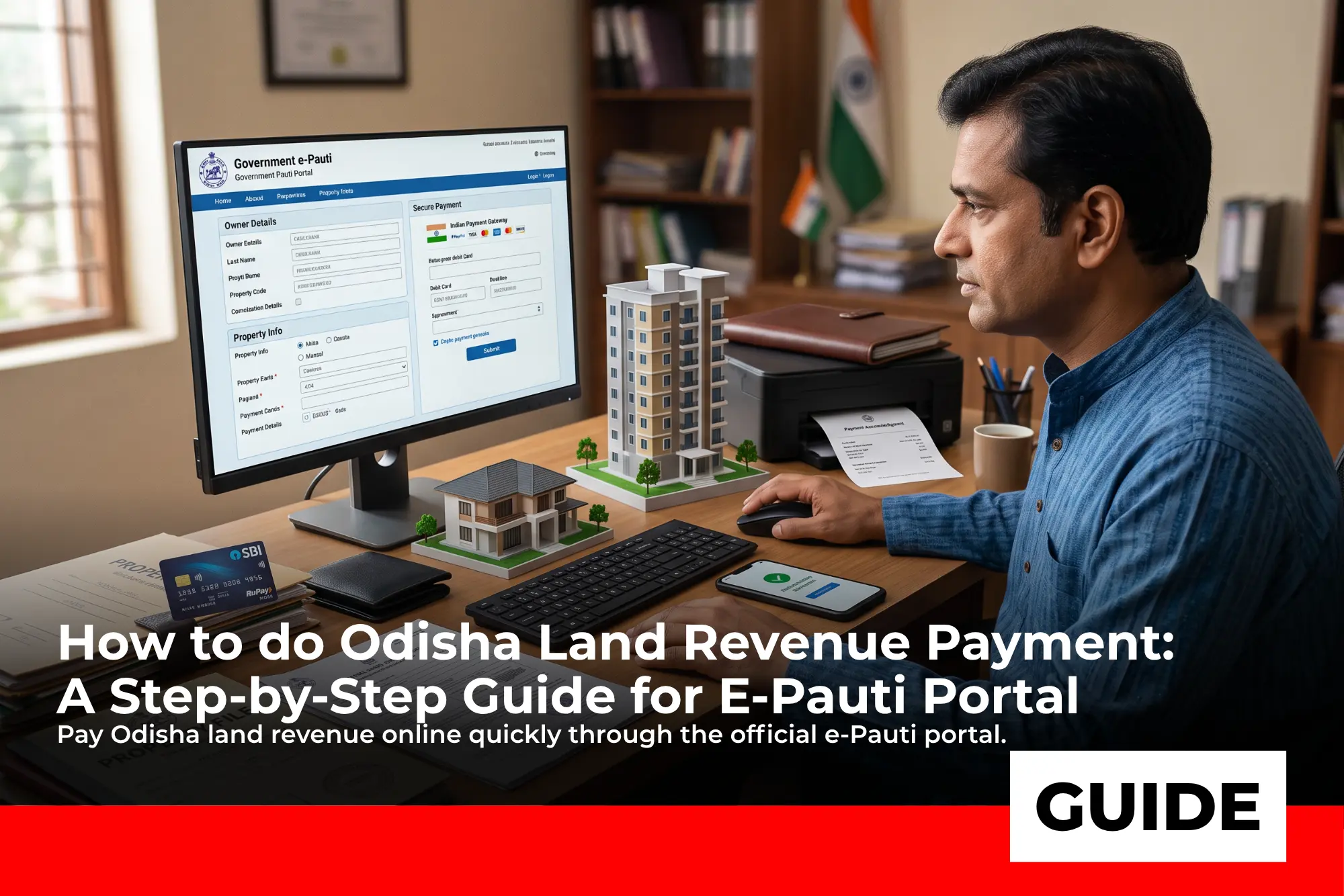
In Odisha, paying land tax either for owned properties, or for flats or apartments is very simple and easy. It is made possible by the e-Pauti Odisha land revenue collection portal.
But it may be confusing for first time users to navigate and pay their land tax through the e-Pauti portal, therefore we have bought you this simple and easy guide guiding you step-by-step for paying your land tax in Odisha. Read on to find out.
What is the e-Pauti portal?
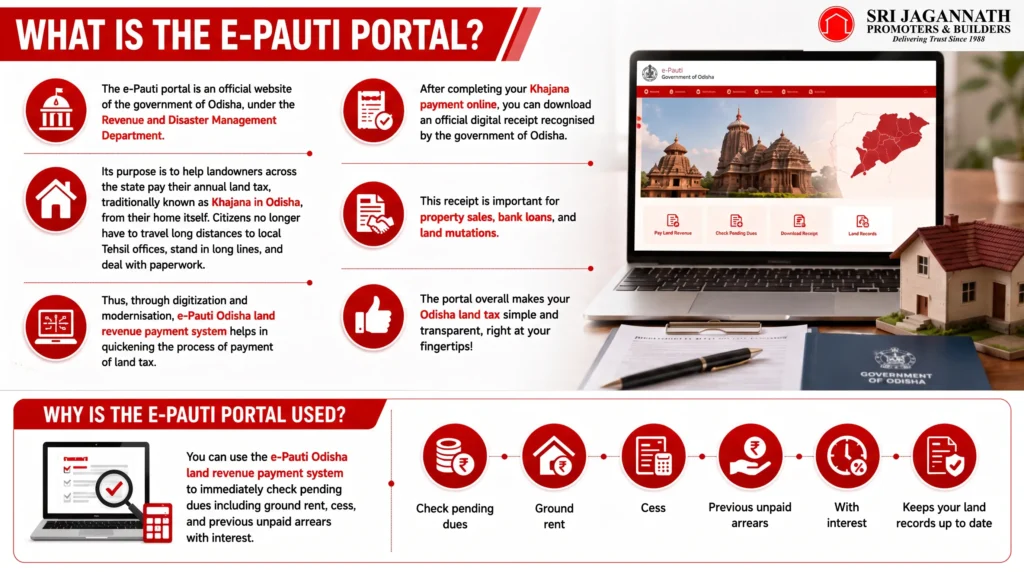
The e-Pauti portal is an official website of the government of Odisha, under the Revenue and Disaster Management Department.
Its purpose is to help landowners across the state pay their annual land tax, traditionally known as Khajana in Odisha, from their home itself. Citizens no longer have to travel long distances to local Tehsil offices, stand in long lines, and deal with paperwork.
Thus, through digitization and modernisation, e-Pauti Odisha land revenue payment system helps in quickening the process of payment of land tax.
After completing your Khajana payment online, you can download an official digital receipt recognised by the government of Odisha.
This receipt is important for property sales, bank loans, and land mutations. The portal overall makes your Odisha land tax simple and transparent, right at your fingertips!
Why is the e-Pauti portal used?
You can use the e-Pauti Odisha land revenue payment system to immediately check pending dues including ground rent, cess, and previous unpaid arrears with interest. It helps keep your land records up to date.
What documents and details do you need before making Odisha land revenue payment?
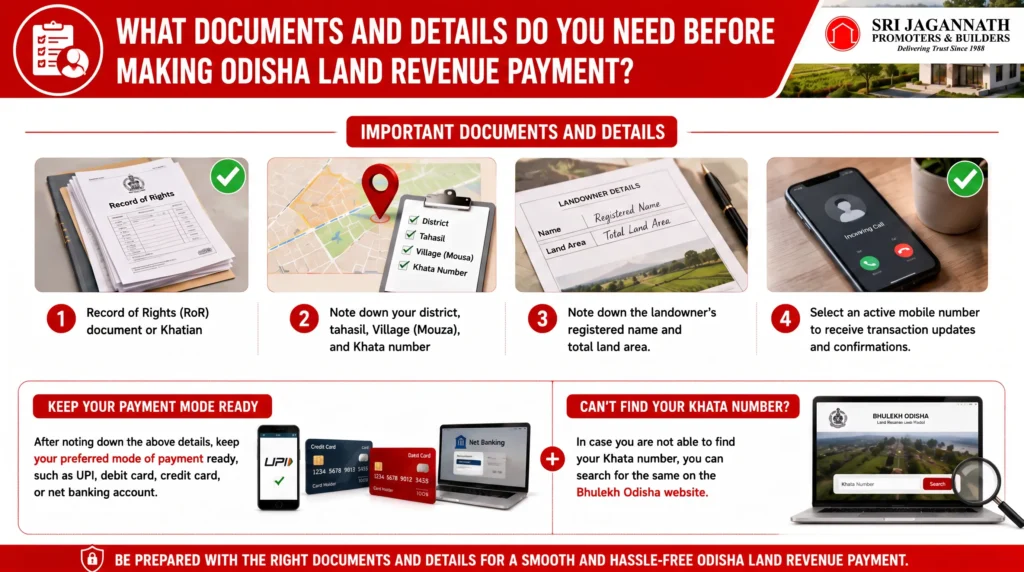
You need to make a note of all the important documents and details which you need before paying your land tax, or Khajana, online through the e-Pauti Odisha land revenue system.
The list of important documents and details are as follows:
- Record of Rights (RoR) document or Khatian
Note down your district, tahasil, Village (Mouza), and Khata number - Note down the landowner’s registered name and total land area.
- Select an active mobile number to receive transaction updates and confirmations.
After noting down the above details, keep your preferred mode of payment, such as UPI, debit card, credit card, or net banking account ready.
You need to make a note of all the important documents and details which you need before paying your land tax, or Khajana, online through the e-Pauti Odisha land revenue system.
The list of important documents and details are as follows:
- Record of Rights (RoR) document or Khatian
Note down your district, tahasil, Village (Mouza), and Khata number - Note down the landowner’s registered name and total land area.
- Select an active mobile number to receive transaction updates and confirmations.
After noting down the above details, keep your preferred mode of payment, such as UPI, debit card, credit card, or net banking account ready.
How to complete your Odisha land revenue payment step-by-step?
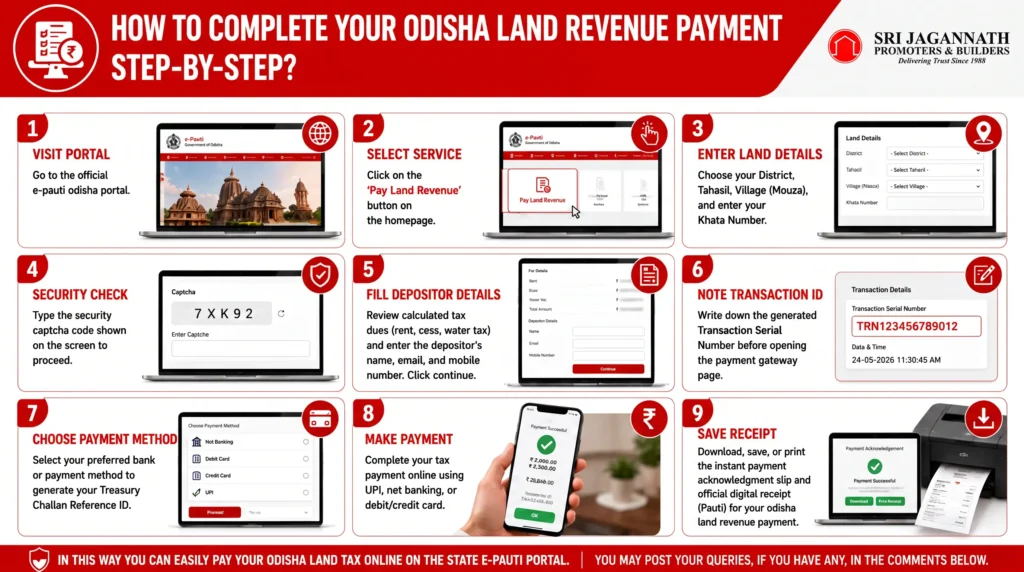
Follow the step-by-step guide given below to easily complete your Odisha land revenue payment online on the e-Pauti portal:
Step 1: Go to the e-Pauti Odisha Website.
Step 2: Click on Pay Land Revenue on the homepage.
Step 3: Select your location and land details. (District, tahasil, Village, and Khata Number)
Step 4: Enter the Captcha
Step 5: Fill in the tenant and fee details (Rent, cess,water tax) along with the depositor’s name, email, and mobile number. Click continue.
Step 6: Note down the Transaction Serial Number (Tran sl no.) before going to the treasury page.
Step 7: Choose your payment mode and bank details. Then click proceed and confirm the details to generate your Treasury Challan Reference ID.
Step 8: Complete your transaction via your chosen payment method.
Step 9: Save or Print the digital payment acknowledgement slip and digital Pauti (receipt).
In this way you can easily pay your Odisha land tax online on the state e-Pauti portal. You may post your queries, if you have any, in the comments below.
| Steps | Description |
|---|---|
| Step 1: Visit Portal | Go to the official e-pauti odisha portal. |
| Step 2: Select Service | Click on the ‘Pay Land Revenue’ button on the homepage. |
| Step 3: Enter Land Details | Choose your District, Tahasil, Village (Mouza), and enter your Khata Number. |
| Step 4: Security Check | Type the security captcha code shown on the screen to proceed. |
| Step 5: Fill Depositor Details | Review calculated tax dues (rent, cess, water tax) and enter the depositor’s name, email, and mobile number. |
| Step 6: Note Transaction ID | Write down the generated Transaction Serial Number before opening the payment gateway page. |
| Step 7: Choose Payment Method | Select your preferred bank or payment method to generate your Treasury Challan Reference ID. |
| Step 8: Make Payment | Complete your tax payment online using UPI, net banking, or debit/credit card. |
| Step 9: Save Receipt | Download, save, or print the instant payment acknowledgment slip and official digital receipt (Pauti) for your odisha land revenue payment. |
How can you download your rent receipt on e-Pauti?
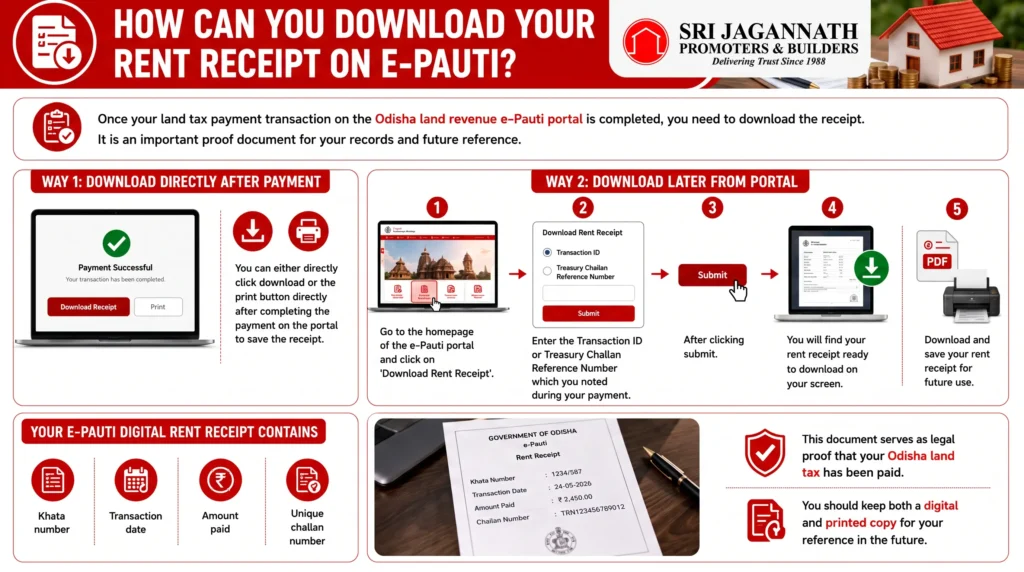
Once your land tax payment transaction on the Odisha land revenue e-Pauti portal is completed, you need to download the receipt. It is an important proof document for your records and future reference.
You can download the rent receipt in two ways. You can either directly click download or the print button directly after completing the payment on the portal to save the receipt.
Or, if you accidentally close the browser, you can go to the homepage of the e-Pauti portal and click on “Download Rent Receipt”. Enter the Transaction ID or Treasury Challan Reference Number which you noted during your payment.
After clicking submit, you will find your rent receipt ready to download on your screen.
Your e-Pauti digital rent receipt contains key information like your Khata number, transaction date, amount paid, and unique challan number.
This document serves as legal proof that your Odisha land tax has been paid. You should keep both a digital and printed copy for your reference in the future.
How to pay land tax for flats in Odisha through the e-Pauti Odisha land revenue system?
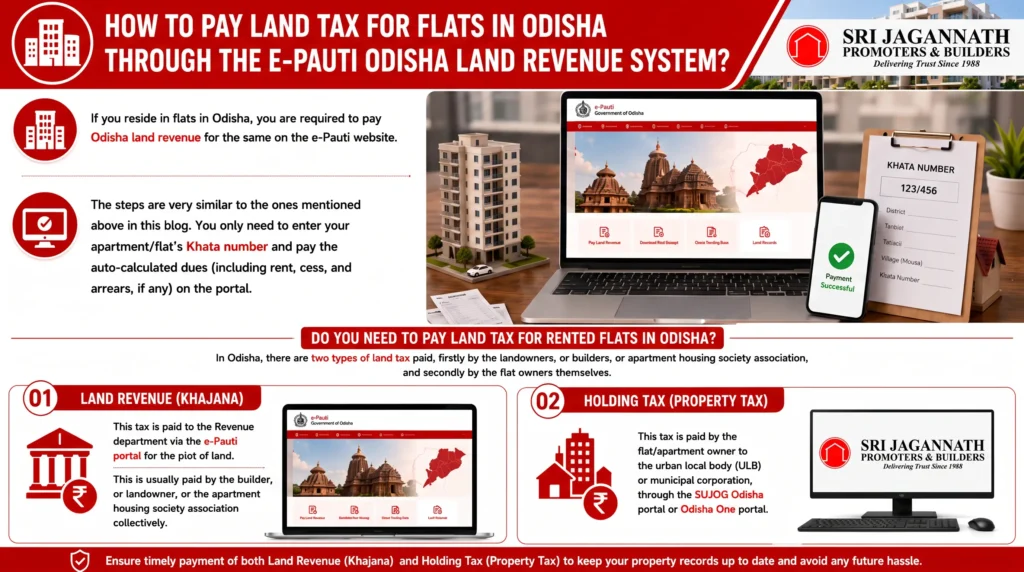
If you reside in flats in Odisha, you are required to pay Odisha land revenue for the same on the e-Pauti website.
The steps are very similar to the ones mentioned above in this blog. You only need to enter your apartment/flat’s Khata number and pay the auto-calculated dues (including rent, cess, and arrears, if any) on the portal.
Do you need to pay land tax for rented flats in Odisha?
In Odisha, there are two types of land tax paid, firstly by the landowners, or builders, or apartment housing society association, and secondly by the flat owners themselves.
The two different types of land tax collected by the Odisha government is explained below:
- Land Revenue (Khajana):
This tax is paid to the Revenue department via the e-Pauti portal for the plot of land. This is usually paid by the builder, or landowner, or the apartment housing society association collectively. - Holding Tax (Property Tax):
This tax is paid by the flat/apartment owner to the urban local body (ULB) or municipal corporation, through the SUJOG Odisha portal or Odisha One portal.
Conclusion
In Odisha, the digitalisation of land services has made property management very easy and transparent for every citizen. You no longer need to wait in long queues to visit government offices for land related work.
You can simply check dues online now, pay taxes, and download official receipts online in minutes, making the process hassle-free.
You can follow this simple guide curated by us for completing your Odisha land revenue payment online on the e-Pauti portal, if you own a land or if you own a flat/apartment in Odisha. If you wish to follow more such simple guided blogs, you can visit our regular blog page.
Frequently Asked Questions (FAQs)
Is the e-Pauti rent receipt legally valid for bank loans and property sales?
Yes, the digital e-Pauti rent receipt is legally valid. Government authorities, courts, banks, and sub-registrar offices accept this Odisha land revenue receipt as proof of land tax payment for loans and property mutations.
What should I do if my money is deducted but the e-Pauti payment fails?
You do not need to panic in this case. If money is deducted during your Odisha land revenue payment online, do not repay immediately. Wait for 24 to 48 hours, then check your payment status on the e-pauti odisha portal using the “Know Your Transaction ID” tool.
How can I find my Khata number for online land revenue payment in Odisha?
You can visit the official Bhulekh Odisha website for checking your Khata number online. You can easily search for your land account details by entering your name, district, tahasil, and village name.
Can I pay land revenue for multiple properties in a single transaction on e-Pauti?
No, you cannot combine multiple land property payments into a single payment. However, you can pay for multiple plots on e-pauti Odisha by completing a separate transaction for each Khata number and village location.
What payment modes are supported for Khajana payment online on e-Pauti Odisha?
You can complete your khajana payment online using various digital payment options through the Odisha iFMS treasury gateway. You can pay through UPI apps (PhonePe, Google Pay), net banking, debit cards, and credit cards from major Indian banks.
Are there any extra service charges for making Odisha land revenue payment online?
No, the Government of Odisha does not charge extra service fee for your Odisha land revenue payment on the e-Pauti portal. You only pay your calculated land tax dues along with standard banking gateway charges, if applicable.
What happens if I miss paying my Odisha land tax on time?
If you miss paying your Odisha land tax, unpaid dues pile up as arrears with interest over time. Pending taxes can also block property sales, delay land mutation, and lead to rejection of agricultural bank loan applications in the future. Hence, make sure to complete payments on time.
What is the difference between Khajana (Land Revenue) and Holding Tax in Odisha?
In Odisha, Khajana is the annual land tax paid to the state Revenue Department via the e-Pauti portal for land plots. Holding Tax is a separate property tax paid to urban municipal bodies for building structures through SUJOG or Odisha One portals.
Do flat or apartment owners in Odisha need to pay land revenue on e-Pauti?
Yes, flat owners must make sure that land revenue is clear and duly paid. Usually, the apartment society or builder pays the collective Odisha land revenue payment on e-Pauti, while flat owners individually pay municipal Holding Tax for their unit.
How can I recover a lost transaction ID or download an old e-Pauti receipt?
You should visit the e-pauti Odisha homepage and click on “Know Your Transaction ID”. Select your financial year, district, tahasil, village, and Khata number to retrieve your ID, then use it under “Download Rent Receipt” to get your transaction ID.








Leave a Reply